Creativity Controls, Not Magic Buttons: Temperature, Style, and Variation Explained for Writers and Teachers
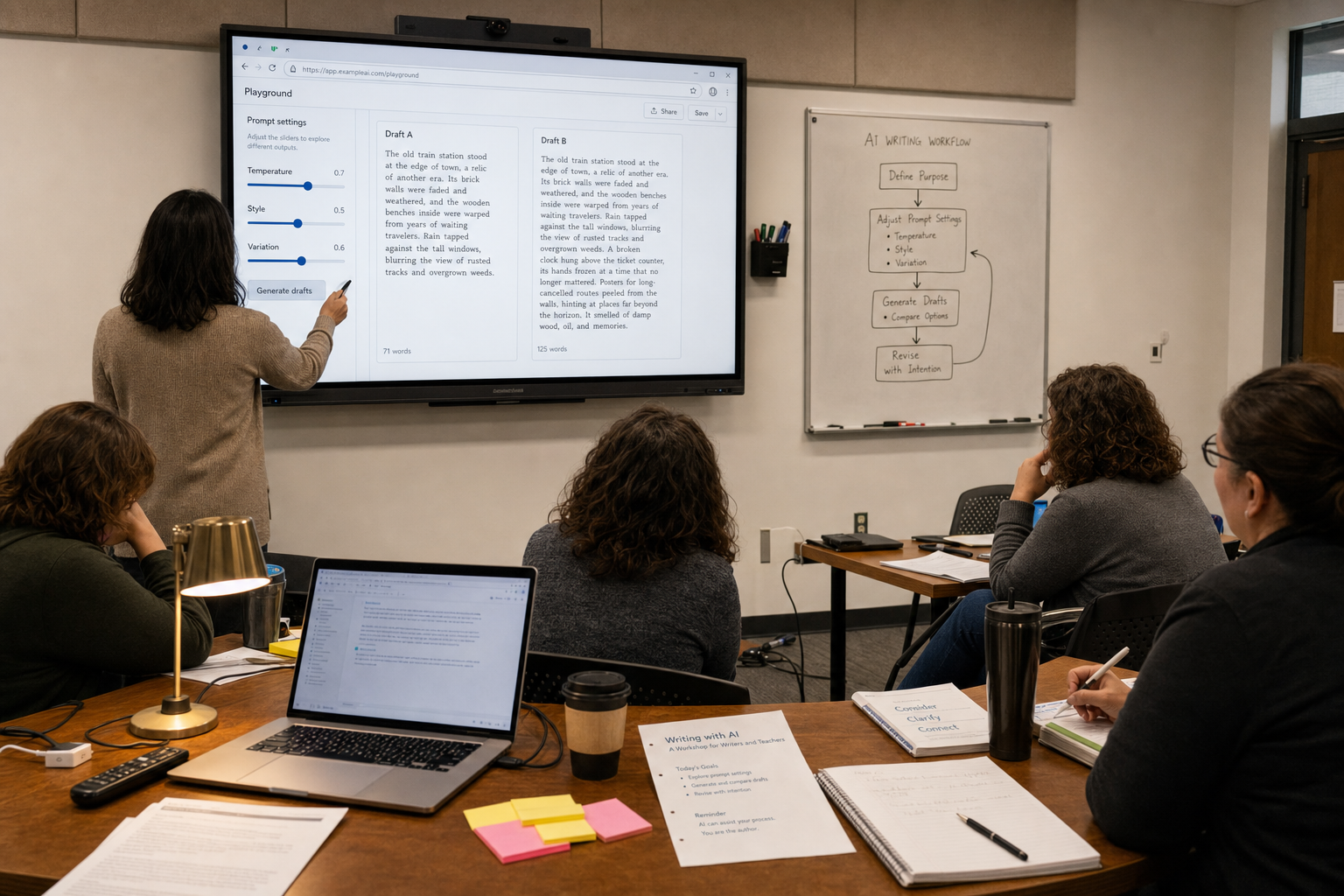
AI writing tools now offer settings with names like temperature, style, and variation. Many beginners see them as simple creativity buttons: turn one up, get better ideas. That is the wrong mental model. These controls do not add talent to a weak prompt or turn a shaky draft into a reliable one. They change how predictable, how shaped, and how diverse the output will be.
This matters because writers and teachers often use AI under time pressure. A newsletter draft, a lesson starter, a feedback comment, or an explanation for younger students can improve with the right settings. It can also get worse. The main tension is clear: these controls can help users explore options, but they can also create noise, bland imitation, factual mistakes, and false confidence. My view is simple: learn the controls, but treat them as editorial tools, not magic.
These settings do not create good judgment. They change the trade-off between precision, voice, and variety.
Temperature changes risk, not intelligence
Temperature is the most misunderstood setting. In plain terms, it affects how adventurous the system is when choosing the next word. At a lower temperature, it stays closer to the most likely phrasing. At a higher temperature, it is more willing to choose less predictable wording and structure.
For a writer, low temperature is usually better when the task needs control: a summary of interview notes, a press release, a product description, or a grant paragraph. The wording may feel less lively, but it is often cleaner and easier to verify. A medium setting can help with headline options, opening lines, or alternative transitions. A high setting may produce surprising ideas, but it also increases the chance of drift, contradiction, or sentences that sound clever without saying much.
For teachers, the pattern is similar. If you need a model answer, a parent email, or a simple explanation of fractions for a mixed-ability class, lower is safer. If you want five different classroom warm-ups on the same topic, a medium setting may help. If you are asking for unusual creative writing prompts, a higher setting can be useful, but it should still be checked for age fit, clarity, and factual accuracy.
The important point is that higher temperature does not mean “more intelligent.” It means less predictable. Sometimes that is useful. Sometimes it is exactly what you do not want.
Style shapes delivery, not depth
Style controls are easier to understand, but they are often oversold. A style setting tells the system how to present the content: formal or conversational, concise or expansive, academic or plain language, adult or child-friendly. Some tools offer built-in presets. Others expect the user to describe the style in the prompt.
Used well, style is one of the most practical controls for real work. A teacher can ask for a science explanation in short sentences for learners at an intermediate English level. A writer can turn a dense internal memo into a clear article introduction. A student support office can rewrite a policy note in plain English without changing the core meaning.
But style can only shape what is already there. It cannot fix weak logic, missing facts, or poor structure. In fact, it can hide those problems. A smooth, friendly tone can make a confused explanation sound trustworthy. A polished “thought leadership” voice can make generic points seem stronger than they are. This is one reason experienced editors still matter: readable prose is not the same as sound thinking.
There is also an ethical risk. If users lean too hard on style settings that aim to imitate a specific living writer, teacher, or public figure, the result can drift from inspiration into imitation. Even when the legal line is unclear, the editorial problem is plain: the writing stops sounding like the person responsible for it.
Variation is for comparison, not autopilot
Variation controls appear in different forms. One tool may call it “generate alternatives.” Another may offer “rewrite” or “make more like this.” The basic idea is the same: produce several versions so the user can compare options.
This is especially useful for early-stage work. A writer can ask for three possible openings to a feature, four headline directions, or two different ways to explain a complex term. A teacher can compare a direct explanation, an analogy, and a short classroom activity on the same topic. Variation helps users see choices they might not have considered on their own.
Still, more versions do not automatically lead to better decisions. They can lead to choice overload. They can tempt users to pick the flashiest line instead of the clearest one. They can also hide a deeper problem: if the prompt is vague, the system may generate many weak options instead of one useful one. Variation works best when the task is narrow and the selection criteria are clear.
The promise is real, but so are the risks
There is a good reason these controls attract attention. They make AI tools feel more collaborative. Instead of accepting the first answer, users can steer the process. That is valuable. Writers can move faster from blank page to workable draft. Teachers can adapt materials for different reading levels, classroom moods, or time limits. Multilingual users can ask for simpler wording or more examples without needing to master every technical detail.
But the risks are not side issues. A higher temperature can increase factual mistakes. A strong style preset can flatten voice into generic platform language. Too much variation can waste time and make users less decisive. In education, there is another risk: students may learn to optimize outputs instead of learning how to argue, revise, and think. AI can support writing practice. It should not quietly replace it.
The counterpoint: maybe the settings matter less than people think
That argument has force. In many cases, the biggest gains come from clear instructions, solid source material, and a well-defined audience. A precise prompt at the default setting often beats a vague prompt with every creativity control turned up. The model itself also matters. Different systems interpret the same setting in different ways, and some tools hide those differences behind simple labels.
So yes, there is a case for not obsessing over the knobs. Beginners do not need to become mini-engineers. They need a good workflow. Still, it would be a mistake to conclude that these controls are meaningless. They matter once the task is clear. They are not the first step. They are the refinement step.
A practical way to use these controls
- Start with the task, not the slider. Define the audience, purpose, format, and must-include facts first.
- Use a lower or default temperature for accuracy-heavy work. Raise it only when you want more range, not when you want more truth.
- Set style after the content is basically sound. Ask for plain English, a specific reading level, or a concise structure when needed.
- Request a small number of variations. Two or three options are often enough. Ten usually creates clutter.
- Compare outputs against a human standard. For writers, that may be the publication’s tone and facts. For teachers, it may be the learning goal, age fit, and rubric.
- Keep your own voice in the loop. Use the tool to produce options, then decide what deserves to stay.
What writers and teachers should remember
For writers, the best question is not “How do I make the AI more creative?” It is “What kind of draft do I need right now?” A reported article intro needs a different setting from a brainstorm of headlines. A client email needs a different setting from a workshop exercise. Good use of AI begins with editorial intent.
For teachers, the question is similar. “What do I want students to learn, and where can variation help without weakening the lesson?” A tool that offers three ways to explain photosynthesis can be helpful. A tool that generates endless polished paragraphs for students to submit is not the same kind of help. The settings should support clarity, adaptation, and practice, not shortcut the learning process.
The right mental model
Temperature, style, and variation are worth learning because they make AI outputs more controllable. But controllable is not the same as trustworthy, and flexible is not the same as original. These settings help users explore possibilities. They do not replace judgment, subject knowledge, or revision.
The most useful habit is simple: treat AI creativity controls the way an editor treats drafts. Adjust them to fit the job. Test a few options. Cut what is weak. Keep what is clear. If users remember that, the tools become less mysterious and more useful.