AI Assistants, Agents, and Automations: A Beginner’s Human-Centered Glossary
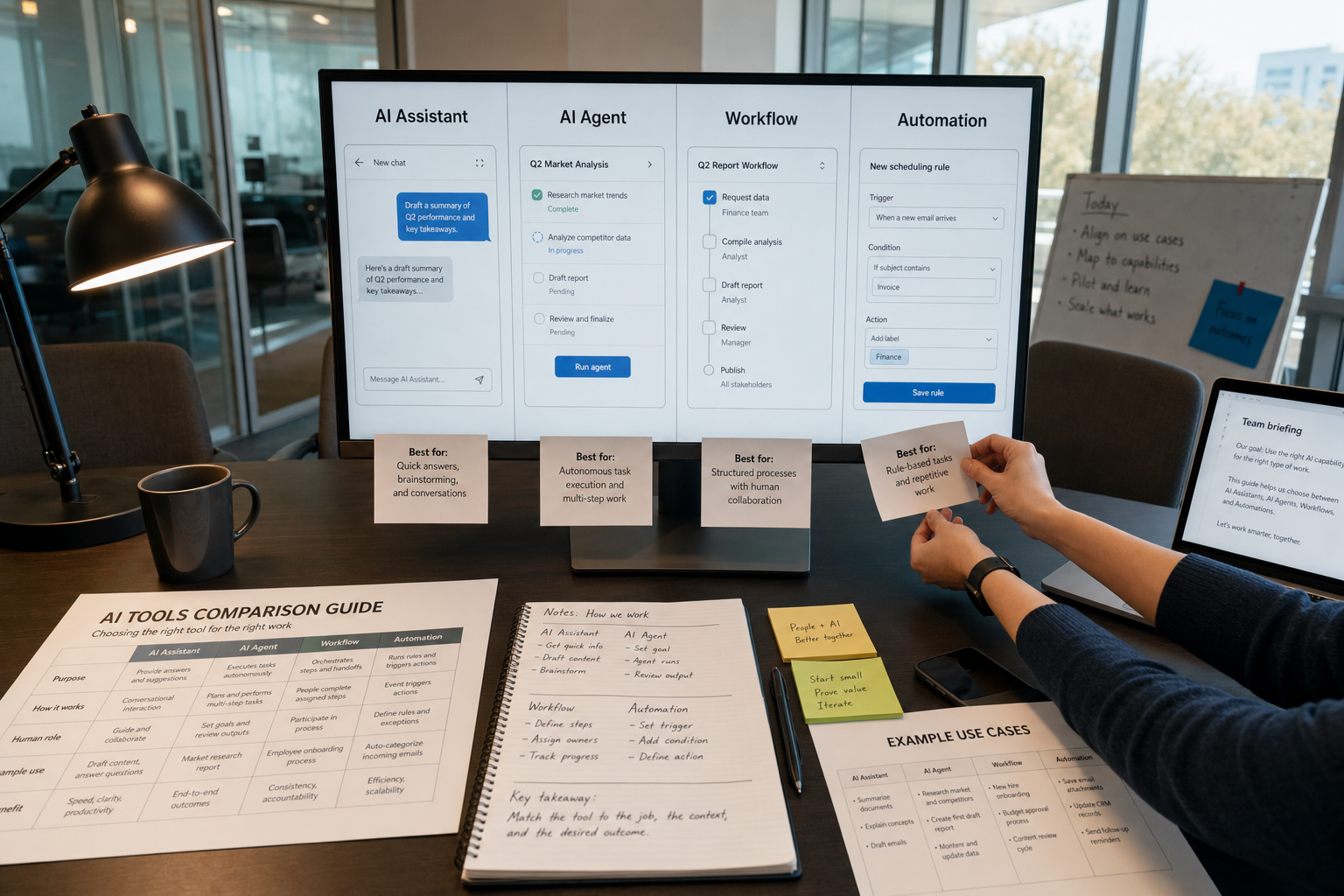
AI products now use assistant, agent, workflow, and automation so loosely that many readers hear them as the same thing. They are not. The difference changes how much a tool can do on its own, how much oversight it needs, and how much harm it can cause when it is wrong.
That is why this matters. The tension is simple: product teams want flexible labels for fast-moving tools, while users need clear labels to make safe choices. My view is straightforward: we should stop using these terms interchangeably. Clearer words lead to clearer expectations, better oversight, and fewer costly mistakes.
Why the words matter
Some of this confusion is understandable. Real products often mix features. A chat window may answer questions, search a database, and trigger an email. The counterpoint is fair: the boundaries do blur.
But that is not a reason to give up on definitions. It is a reason to use better ones. A human-centered glossary should tell you who stays in control, who approves actions, and what happens if the system fails. If the language hides those points, it is not just vague. It is risky.
Assistant
Plain meaning: A system that helps a person do a task after being asked.
How it works: The human stays in charge. The tool suggests, drafts, summarizes, translates, or answers. It usually does not take important actions on its own.
Promise: Assistants can save time and make it easier to start difficult or repetitive work.
Risk: They can still produce false, incomplete, or biased output. Because the writing often sounds confident, people may trust it too quickly.
Example: You ask an AI writing assistant to draft meeting notes, then you review and send them.
Agent
Plain meaning: A system that can pursue a goal across several steps with less direct human input.
How it works: The user sets the task, but the system may plan sub-steps, use tools, pull information, and take actions between checkpoints.
Promise: Agents can reduce manual work in tasks that are repetitive but not fully fixed.
Risk: A small mistake can travel further because the system acts, not just suggests. The more access it has, the more review, limits, and logs it needs.
Example: You ask a system to find overdue invoices, draft reminder emails, and queue them for approval.
Automation
Plain meaning: A process that runs automatically once rules and triggers are set.
How it works: It follows a defined path. If one condition is met, a preset action follows.
Promise: Automations are often the safest and cheapest way to remove routine busywork.
Risk: Bad rules scale bad outcomes. An automation will repeat the same mistake every time until someone fixes it.
Example: When a customer submits a form, the system creates a support ticket and sends a confirmation email.
One practical point matters here: not every automation needs AI. In many offices, ordinary rule-based software is easier to test, cheaper to run, and simpler to audit than a more flexible AI system.
Workflow
Plain meaning: The full sequence of steps needed to finish a task.
How it works: A workflow can include people, assistants, agents, databases, and automations. It is the bigger process, not one tool.
Promise: Clear workflows reduce missed steps and make handoffs easier.
Risk: Badly designed workflows can hide responsibility. Everyone touches the process, but no one clearly owns the result.
Example: A hiring workflow may include screening, scheduling, interviews, reference checks, offer drafting, and final approval.
The line that matters most: agent or automation?
This is where beginners get misled most often. An automation follows a map. An agent can choose among routes within some limits. That extra flexibility can help with messy tasks, but it also increases the need for oversight.
If you need consistency, speed, and a clear audit trail, automation is usually better. If you need adaptation, tool use, and multi-step problem solving, an agent may help, but only if the task is bounded and easy to review.
Other terms that often confuse people
Chatbot: A conversational interface. A chatbot may be simple or advanced. Not every chatbot is a true assistant, and not every assistant works through chat.
Copilot: Usually a product name for an assistant that works beside a user inside another application. The label suggests support, not independence.
Human in the loop: A person reviews or approves key steps. This matters most when the output affects money, health, safety, jobs, education, legal matters, or public communication.
Guardrails: Limits on what a system can access or do. Examples include approval gates, spending caps, blocked actions, source restrictions, and audit logs.
Tool use: The ability to call other software, such as email, calendars, search, or databases. Tool use makes a system more capable, but not automatically more trustworthy.
How marketing muddies the picture
Some companies call a tool an agent because the word sounds more advanced than assistant. Others market basic automations as AI because that sounds more modern. The fact is simple: product language often stretches to match the moment.
My view is that this is not harmless. If a product can send messages, update records, approve actions, or publish something, users deserve plain language about that power. A softer label can lead teams to underestimate the need for review.
If a tool can send, approve, delete, publish, buy, or change records, treat it as more than “just an assistant.”
A simple test before you adopt any tool
Ask five questions.
- Who starts the task? If a person must begin and steer it, you are closer to assistant territory.
- Who approves the final action? If the system acts before review, you are closer to agent or automation territory.
- What systems can it touch? Email, payments, databases, calendars, and customer records raise the stakes.
- What is the cost of a mistake? Low-risk errors are annoying. High-risk errors need tighter controls and often human approval.
- Does this task even need AI? If stable rules can handle it, simple automation is often the better choice.
The better default
The strongest position here is also the simplest one: choose the least autonomous system that still solves the problem. Start with the workflow. Add automation where rules are stable. Use assistants where people benefit from drafting, search, or summarizing. Use agents more carefully, mostly for bounded tasks with clear checkpoints.
This is not anti-AI. It is basic operational discipline. The more freedom a system has, the more attention you must give to permissions, review, and responsibility.
Words shape decisions
When people use assistant, agent, automation, and workflow as if they mean the same thing, they make sloppier choices. They buy the wrong tools. They trust the wrong features. They miss who is accountable.
A better glossary will not solve every AI problem. But it does something important: it makes the human role visible again. And that is usually the first step toward using these systems well.